Recent Update

Showing posts with label Social Widgets. Show all posts
subscription box, facebook like box
First see this widget. How nice the widget is! It is a social widget for blogger. Here subscription box, facebook like box, twitter follow box, Google+ box, linkedin box are available. It is easy to do. Do you want to add this widget to your blogspot blog? It looks like so beautiful. By add this widget you can increase your blogs attraction. By this widget visitor will get your posts via feed box. besides they can like or follow your facebook fan page or twitter's twit. It also make your blog seo friendly. If you agree to add this widget follow me and do what i say.

First go to your blogger account. Here you will get your "Dashboard'. From here select "Layout".


Now a new page will reopen. From here select "Ad a gadget".


Now a new mini page will open from here select "HTML/JavaScript"

A code box will appear. Now paste the bellow code in the code box.

<a href="YOUR RSS FEED URL" title="Subscribe to Feed" target="_blank"><img src="https://blogger.googleusercontent.com/img/b/R29vZ2xl/AVvXsEh4usAjglUVNlUARy1Xvm8HZgh5V6c2WfpBJrdB-OuCkVrxUuV2iI5X87T3GaHz36BT5A59YhPKzkt9TBjdrnramV0gs2mz8YWn6BhKzf7VukHlJMRv4W7XnV7v5O5SovpLNx6eJYSQ1Ro/s1600/rss2.png "/><strong></strong> </a>
<a href="YOUR FACEBOOK PAGE URL" title="Like on Facebook" target="_blank"><img src="https://blogger.googleusercontent.com/img/b/R29vZ2xl/AVvXsEgKnWD1RijFsMfCwt_GR1XwS4mPi7aRk2PlwtyP7cHW2LjUC5E2KZhHgr3XvZkytFmKsRiOaFDUBmoYNcBl4BXflPRj7Eb89P5AieHd0sCgBM6zOIGFFnulN4ThIGSgSvSB60igqarKw0o/s1600/facebook2.png"/><strong></strong> </a>
<a href="YOUR TWITTER URL" title="Follow on Twitter" target="_blank"><img src="https://blogger.googleusercontent.com/img/b/R29vZ2xl/AVvXsEiUS-9J09Lp4nY12ha4PvT15xLGrXPD3cyhEI16Rvm91fubO2mnOLDE10aN0n9Y5VZnf_pW8w_kg8Xqg413zJkdniZDgkvv5-jUeDyOUwYeVic3JWu4soTF9pLQ5Rcjpnc-93z9dZLAdCc/s1600/twitter2.png "/><strong></strong> </a>
<a href="YOUR GOOGLE+ URL" title="Add to Circle" target="_blank"><img src="https://blogger.googleusercontent.com/img/b/R29vZ2xl/AVvXsEiZxnml2EUIdXJ4hLwjnEyibVLOLXlZdg3XlQrsF_f9JpKgJeSigmXTiJqislFt9h891mCyFnnQLs0wUj7j0WbeYcnP-nG6dYVzKkSoUARzcVZkb4TFabAXWl__a6sphwkupvOw9FBmXQo/s1600/google-plus2.png "/><strong></strong> </a>
<a href="YOUR LINKEDIN url" title="Follow on LinkedIn" target="_blank"><img src="https://blogger.googleusercontent.com/img/b/R29vZ2xl/AVvXsEjZm8mzv6VSQgW-Mton7jK9-S5x9eu0iL2Xw4i-ox6WrrKSsJq_67Xz9EA-kRoLnS4prMi81P9cYhH-hM61Hsu0q8yYZuxZlPX-CyIyZWrzWUhql5LFwfFsojWrXH8N4C-CefwUckuSJKU/s1600/linkedin2.png "/><strong></strong> </a>
<a href="YOUR SLIDESHARE URL" title="Follow on Slideshare" target="_blank"><strong></strong> </a>

Customize:
1. Change "YOUR RSS FEED URL" with your feed url
2. Change "YOUR FACEBOOK PAGE URL" with your facebook page url
3. Change "YOUR TWITTER URL" with your twitter url.
4. Change "YOUR GOOGLE+ URL" with your google+ url.
5.  Change "YOUR LINKEDIN URL" with your linkedin url.
6.  Change "YOUR SLIDESHARE URL" with your slideshare url


 Note: If you like this widget please give your comment and share this with your friends


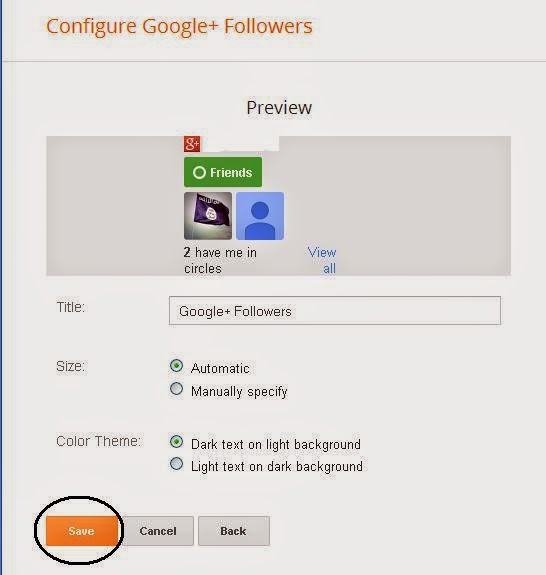
Friend do you want to add Google+ follower button to your blogspot blog? Yes, you can add this very simply. It takes a few minutes to do it. Besides new members can join to your circle through this widget. In This widget your circle friends pictures will show. It makes your blog more attractive. To do it follow me....................

First log on to your blogger account. After log in you will get your Dashboard. From here click "Layout" option. Then a new page will open from here select "Add a gadget" like bellow.
Then a mini page will open. From here click "Google+ Followers". Now a new page will reopen. From here Click "Save" option.

You have done it. Now enjoy it.Wish your best blogging. If you like it give your comment bellow.


Sliding Follow Or Like Box For Blogger


My post is for them who has blogger blog. Now I am sharing with you some social widgets for blogger. When we visit other’s blog site, we can see that any one side of the blog has facebook or twitter or google plus icon. And when we keep our mouse cursor in any of these then it slides. Do you want to add these widgets? You can add these widgets to your blog for free.  As a result your visitor will increase. And increase your facebook like or twitter follower. To add these widgets follow my instructions.

Process: 1

Go to blogger. Then log in here with your ID and Password. From here click “Template”. A new page will open like bellow. 


Here select “Edit HTML”. You will get your HTML codes. From here find(Ctrl + F) the bellow code.
                                
</head>

Then paste the bellow code above the the code </head>.

<script src=”https://ajax.googleapis.com/ajax/libs/jquery/1.6.1/jquery.min.js” type=”text/javascript”></script> 


Process: 2

Now go to “Dashboard”. From here select”Layout”. Then select “Ad a gadget”. A new page will reopen. From here select “HTML/Java Scripts”.
Then paste the bellow code.

For facebook like:

 Code:


<script type="text/javascript">
//<!--
$(document).ready(function() {$(".w2bslikebox").hover(function() {$(this).stop().animate({right: "0"}, "medium");}, function() {$(this).stop().animate({right: "-250"}, "medium");}, 500);});
//-->
</script>
<style type="text/css">
.w2bslikebox{background: url("https://blogger.googleusercontent.com/img/b/R29vZ2xl/AVvXsEh-iWfVkmmEU3V5sKAy3NE1kH7RCm4b2aERuOrg1eVl8PntPd2xGxDks-iEdJqXzuQ4QKWVd8gIja4UyTPJPreaewtn6bHn_jaZMqppbhB8HsgVZjhBUYTaSUH9R964pjOJSraOTsCFkaRo/s150/w2b_facebookbadge.pn") no-repeat scroll left center transparent !important;display: block;float: left;height: 270px;padding: 0px 5px 0 40px;width: 245px;z-index: 99999;position:fixed;right:-250px;top:1%;}
.w2bslikebox div{border:none;position:relative;display:block;}
.w2bslikebox span{bottom: 12px;font: 8px "lucida grande",tahoma,verdana,arial,sans-serif;position: absolute;right: 6px;text-align: right;z-index: 99999;}
.w2bslikebox span a{color: #808080;text-decoration:none;}
.w2bslikebox span a:hover{text-decoration:underline;}
</style><div style=""><div>
<iframe src="http://www.facebook.com/plugins/likebox.php?href=http%3A%2F%2Ffacebook.com%2F Your ID&amp;width=245&amp;colorscheme=light&amp;show_faces=true&amp; connections=9&amp;stream=false&amp;header=false&amp;height=270" scrolling="no" frameborder="0" scrolling="no" style="border: medium none; overflow: hidden; height: 270px; width: 245px;background:#fff;"></iframe></div></div>


Note: Change this Your ID with your user name. Then save thee gadget.

For twitter follow:


Code:


<script type="text/javascript">
 
//<!--
 
$(document).ready(function() {$(".twitterboxot").hover(function() {$(this).stop().animate({right: "0"}, "medium");}, function() {$(this).stop().animate({right: "-250"}, "medium");}, 500);});
//-->
</script>
<style type="text/css">
.twitterboxot{background: url("https://blogger.googleusercontent.com/img/b/R29vZ2xl/AVvXsEgblPfWJrzGBzT_rJ9vxJElj3iiJbNf7UAjo2aaMKBIse72WhZTH8PXzYuap5bx5ErqEWXcOUjFS_Q73MaOaheNM9sVtDftdQxUtf4G_Sb9jg4KRSXYRVjM0Aih7Y3DTAPoygCHchDmVFE/s1600/twitterfanbox-OT.png") no-repeat scroll left center transparent !important;
display: block;
float: right;
height: 240px;
padding: 0 5px 0 46px;
width: 245px;
z-index: 99999;
position:fixed;
right:-250px; top:35%;}
</style>
<div><div>
<script type="text/javascript"
src="http://ultimateblogmanager.googlecode.com/files/sliding%20twitter%20box.js"></script><div
id="twitterfanbox"></div><script
type="text/javascript">fanbox_init("Your ID");</script></div></div>

Note: Change this Your ID with your user name. Then save thee gadget.

For Google plus:

<script src="https://ajax.googleapis.com/ajax/libs/jquery/1.6.1/jquery.min.js" type="text/javascript"></script>
<script type="text/javascript">
//<!--
$(document).ready(function() {$(".gplusbox").hover(function() {$(this).stop().animate({right: "0"}, "medium");}, function() {$(this).stop().animate({right: "-330"}, "medium");}, 500);});
//-->
</script>
<style type="text/css">
.gplusbox{
background: url("https://blogger.googleusercontent.com/img/b/R29vZ2xl/AVvXsEjYtKCVS0WpcMeE2ptpDhU5zw2cgppVpXvHqn49DzuKoGCe0IMhYpd_i0nBrllGwyLZD-qrsXNDuqfErpkFwsHJgiQzBlww0Y5XXgFxGvchi0ObbRCoxaBCTJeqyvia8YC4822exh2TpjuK/s1600/g++lordhtml.jpg") no-repeat scroll left center transparent !important;
display: block;
float: right;
height: 330px;
padding: 0 0px 0 46px;
width: 325px;
z-index: 99999;
position:fixed;
right:-330px;
top:60%;
}
.gplusbox div{
padding: 15px;
background: white;
border: 2px solid #D64937;
border-right: 0;
}
</style>
<div><div>
<div data-action="followers" data-height="300" data-href="https://plus.google.com/Your ID" data-source="blogger:blog:followers" data-width="320">
</div>
<script type="text/javascript">
(function() {
window.___gcfg = {'lang': 'en'};
var po = document.createElement('script');
po.type = 'text/javascript';
po.async = true;
po.src = 'https://apis.google.com/js/plusone.js';
var s = document.getElementsByTagName('script')[0];
s.parentNode.insertBefore(po, s);
})();
</script>
</div></div>​

Note: Change this Your ID with your user name. Then save thee gadget.

Do you like this post? If you like this post please give your valuable comment and visit this site regularly to get more tips and tricks for blogger. Friend I am waiting for your valuable comment.


Floating sharing button widget for blogger

Hi everybody! How are you? In this post I will share a nice floating widget for blogger. When we visit other’s site we can see that these sites have different sharing button. Through this widget anyone can share his or her choose able post with his or her friends. As a result the visitor of a site will increase. So you can add this nice widget to your blog. Thus the visitors of your site can share your posts with his friends. As a result you site’s visitor will increase. So try it for you. There are many sharing button widget for blogger. It is one of them. This widget is very nice. It will float in your blog. To add this widget you have to follow two processes. Let’s stat...... 


Process 1:

For this you must log in to your blogger account. After logging in blogger a new page (Dashboard) will open. Here click “Template” option. You will find this “template” option like bellow the image. 


Then a page will open. From here click “Edit HTML”


Now find this bellow code (Find tips: Ctrl +F).

Code:


<head>


After finding this code paste the bellow code (after the code <head>)

Code:


<script type="text/javascript">var switchTo5x=true;</script>
<script type="text/javascript" src="http://w.sharethis.com/button/buttons.js"></script>
<script type="text/javascript" src="http://s.sharethis.com/loader.js"></script>


Now save the template.
Process 1 is finished.

Process 2:

Now click “Layout” option. Here you will get a “Add a gadget” option to add something. From this option select “HTML/Java Script”. A box will open. 


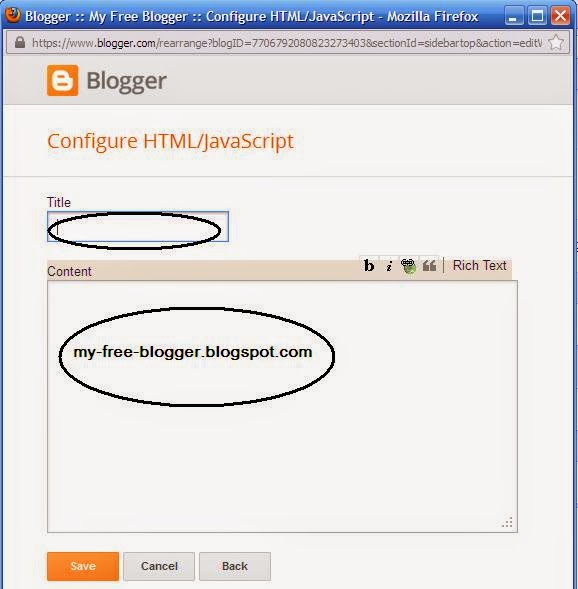
Here you will see two blank options. One is Title and another is Textbox. You may keep blank the Title option. Now paste the bellow code in the text box.

Code:


<script type="text/javascript">stLight.options({publisher: "c117a274-6da3-437e-8e5b-63a46ebfe6af"});</script>
<script>
var options={ "publisher": "c117a274-6da3-437e-8e5b-63a46ebfe6af", "position": "left", "ad": { "visible": false, "openDelay": 5, "closeDelay": 0}, "chicklets": { "items": ["facebook", "twitter", "linkedin", "reddit", "googleplus", "delicious", "pinterest", "email", "sharethis"]}};
var st_hover_widget = new sharethis.widgets.hoverbuttons(options);
</script>


 Now save it. You have done it. Visit your blog and you will see the floating sharing widget.


Note:
If you like this post please give your valuable comment and visit this site regularly to get more tips and tricks for blogger.